 Paperclip Studio
Get it for $19.99
Paperclip Studio
Get it for $19.99Sort your finances in 2027.
Clearline is your all-in-one budget tracker and annual budget planner for Excel and Google Sheets. Put your bills in once, tick them off when they're paid, and always know what's left before payday.
One payment, no subscription. 7-day refund.
- 15
- tabs. Sounds like a lot. The first one, Start Here, tells you where to begin.
- 6
- files: Excel and Google Sheets, each with a filled-in sample plus blank light and dark copies.
- 8
- pages in the PDF guide. It's short.
- 15
- minutes, about, to put in your own bills.
Why most budget planners get dropped.
If you've started a budget before and quit, I'd guess it was one of these.
You typed in the same rent again. And the phone bill. And Netflix.
You knew your balance, but not what you could spend before the next paycheck.
Debt was in one file, savings in another, and you stopped opening both.
Clearline is built around those three. Your bills go in once. There's a page just for what's left before payday. And debt, savings and spending all sit in the same file.
How the budget tracker works
Put your bills in once
Rent, phone, subscriptions. The day each one's due and how often it repeats.
Tick them when they're paid
That's the monthly chore. Anything else you buy goes in Transactions.
Open the dashboard
What came in, what went out, and what's left.
One paycheck
From the sample file, 12 Nov to 25 Nov. The household is made up. The sums are real.
A budget planner, bill tracker and paycheck planner in one file
Clearline is a 2027 annual budget planner template, and it works for any year. It covers your monthly budget, a bill tracker with a bill calendar, a paycheck planner, a debt payoff tracker, savings goals, net worth and an expense tracker. It's new, so there are no reviews yet. What I can do is show you the real thing: every screenshot below is the sample file that comes in the download, with made-up numbers.
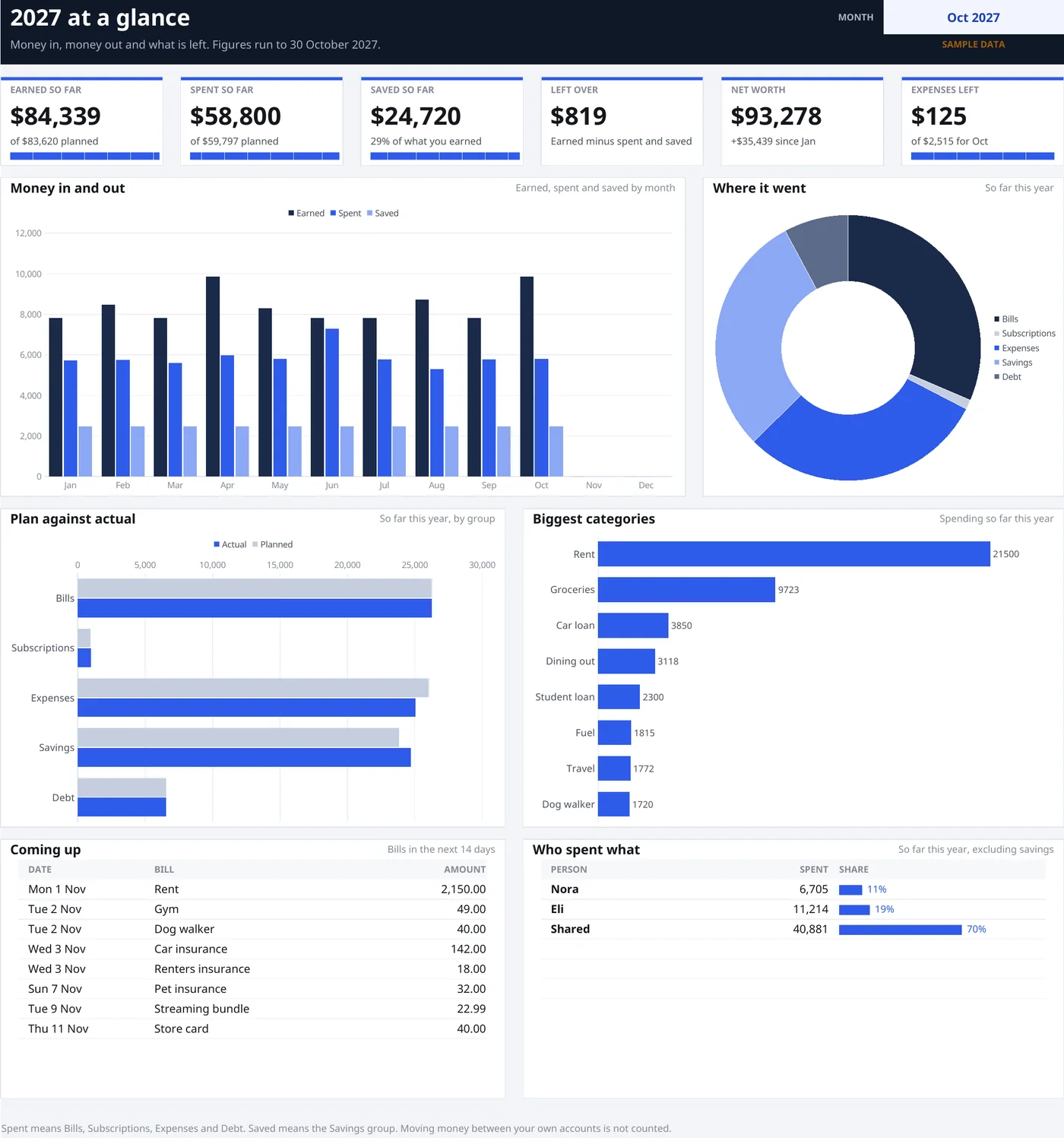
Budget dashboard: the page you'll open first
- What came in, what went out, what you've saved
- Plan against actual, by category
- Where the money really goes
- Bills coming up soon
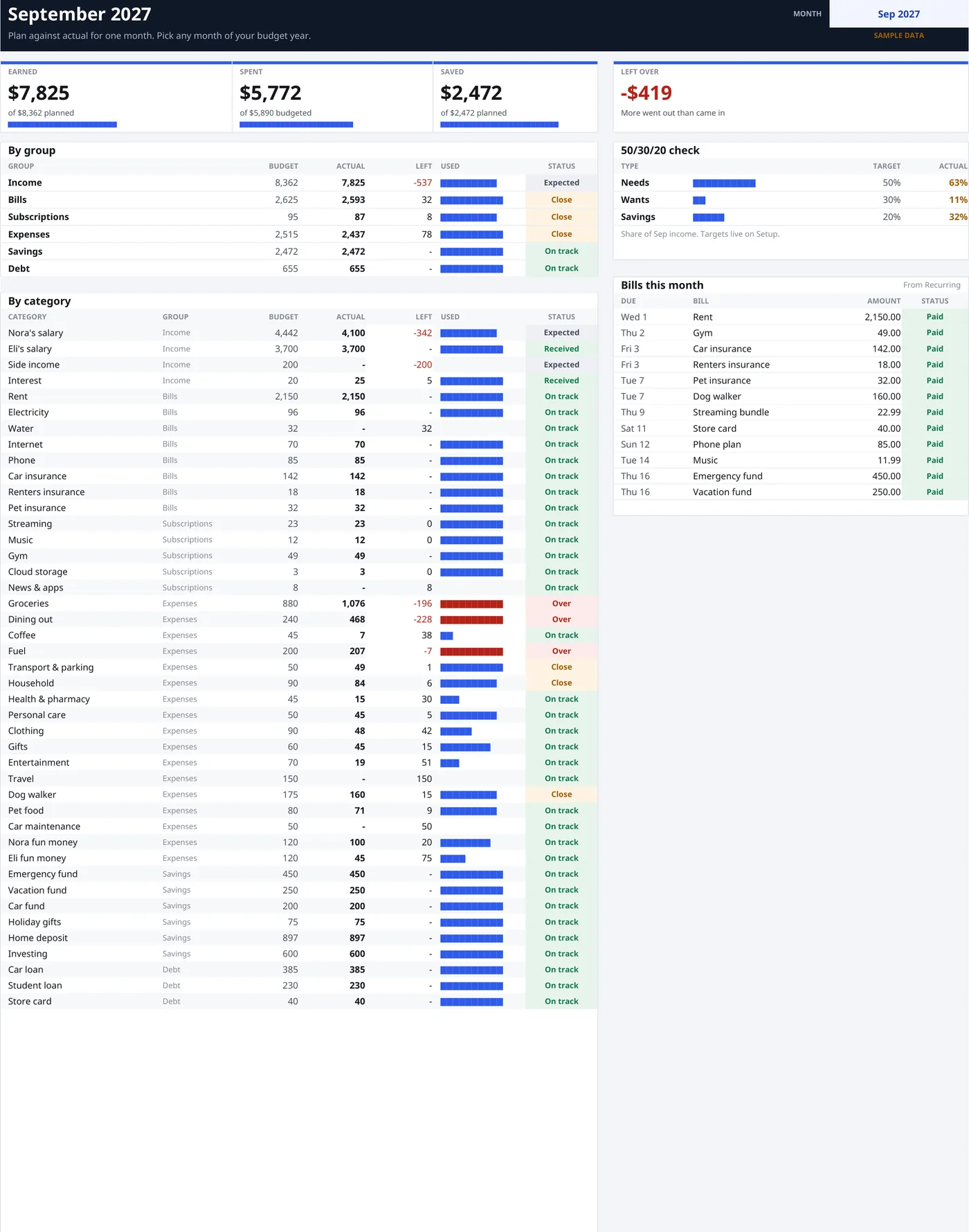
Monthly budget planner, one dropdown
- Pick the month and the whole page changes
- Planned, spent and left, line by line
- Which bills are paid and which aren't
- A quick check on needs, wants and savings
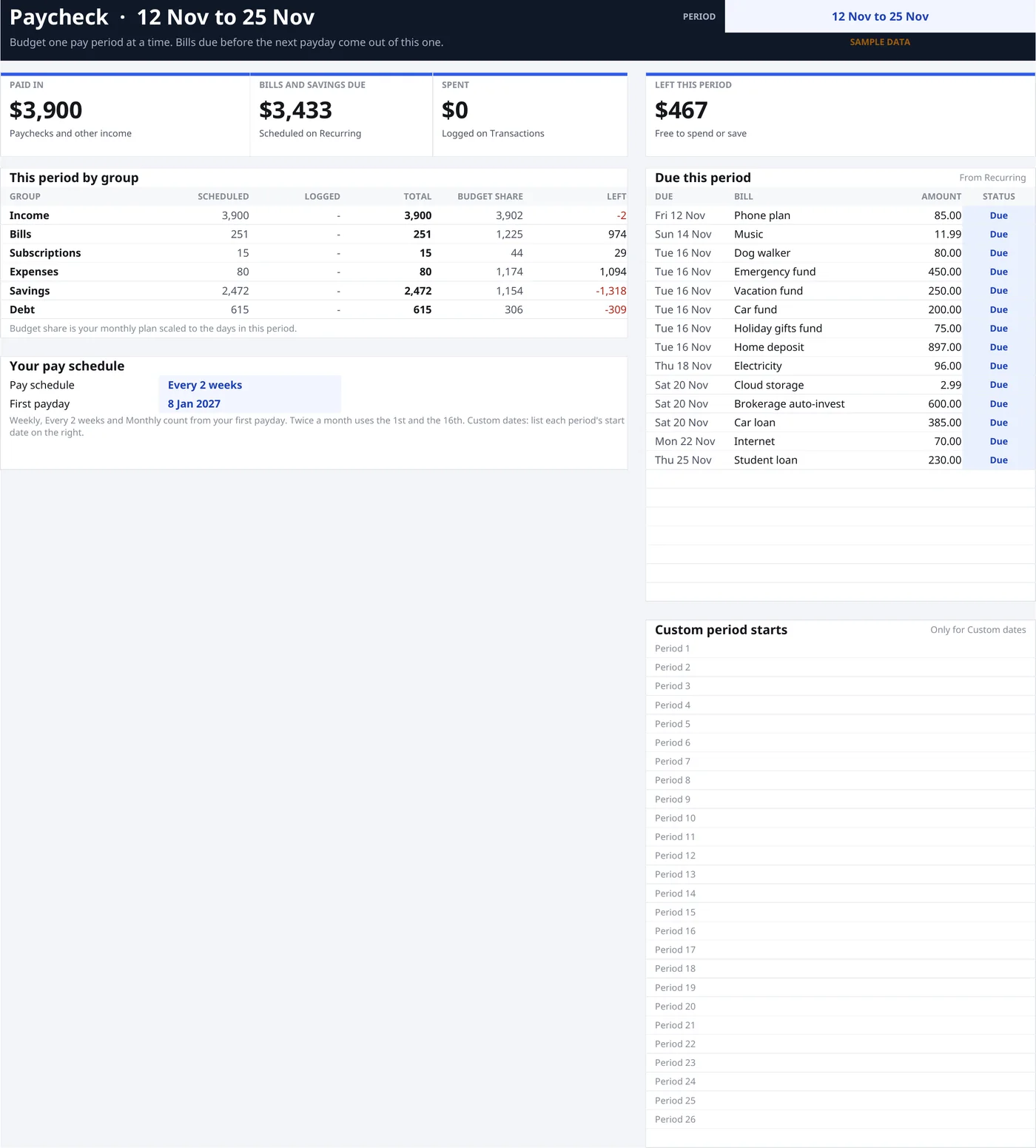
Paycheck budget: what can I spend before payday?
- Tell it how often you're paid, once
- See the bills landing before your next paycheck
- Left to spend for that pay period, not the whole month
- Paid at odd times? Put in your own start dates
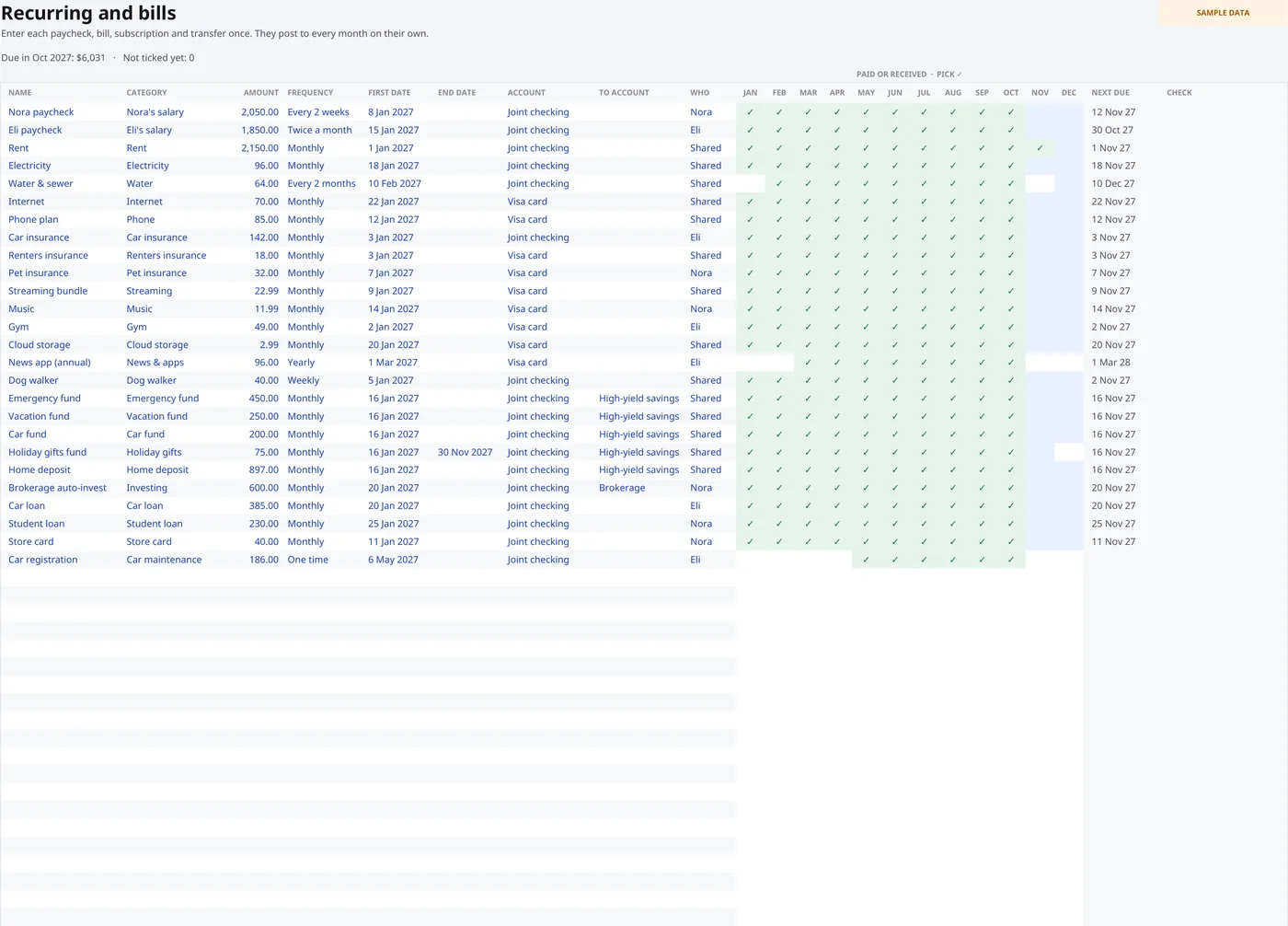
Bill tracker: tick it when it's paid
- One list for everything that repeats
- A box for each month
- A bill calendar with every due date in the year
- The totals sort themselves out
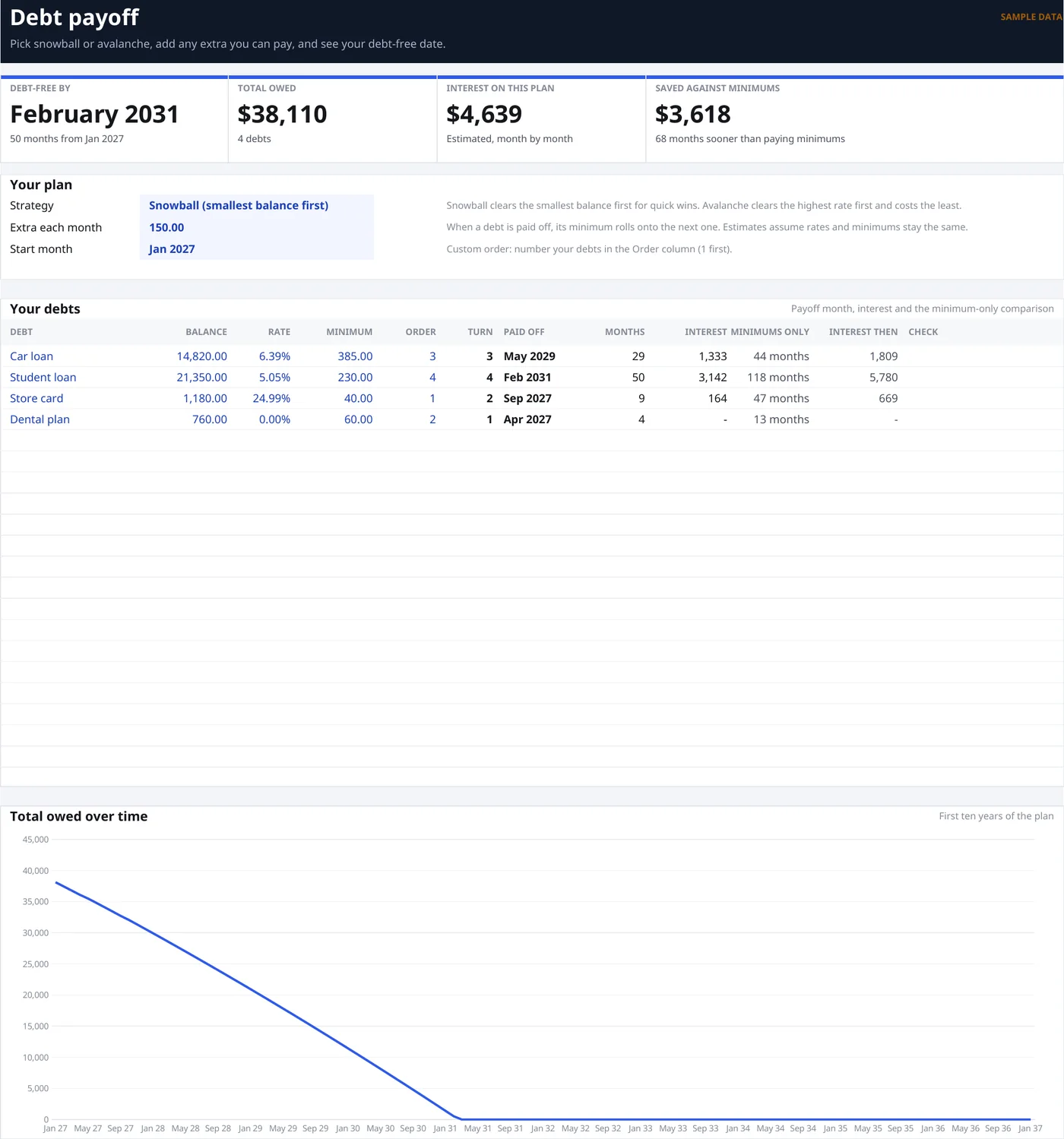
Debt payoff tracker: snowball or avalanche
- Put in each balance, rate and minimum payment
- Flip the method and watch the payoff order change
- Add an extra amount to see the date move
- A rough idea of the interest. It's an estimate
All 15 tabs in the budget template
Look
- Start Here
- how to use the file
- Dashboard
- the year at a glance
- Month
- one month, by category
- Calendar
- every bill on its day
- Paycheck
- what's left before payday
- Year
- all twelve months side by side
Enter
- Transactions
- your expense tracker
- Recurring
- bills you enter once
- Budget
- planned amounts by category
- Setup
- your year, categories and pay schedule
Grow
- Savings Goals
- what you're saving toward
- Debt Payoff
- snowball or avalanche
- Net Worth
- what you own and owe
- Investments
- track your holdings
- No-Spend
- count your no-spend days
Is this budget planner for you?
A good fit if
- You don't mind typing in your own transactions
- You already use Excel or Google Sheets, or you're happy to
- You like seeing the actual numbers
Skip it if
- You want your bank to feed it automatically. This doesn't connect to banks
- You want a phone app. This is a spreadsheet
- You want it to run itself. You do have to tick the boxes
Why it works this way
Clearline is one of the spreadsheets I make at Paperclip Studio. Two ideas shaped it. You shouldn't retype what never changes. And the useful question usually isn't "what's my balance?", it's "what can I spend before I get paid?"
It doesn't connect to your bank, and that's on purpose. No logins to hand over, and nothing breaks when a bank redesigns its website. If something doesn't work for you, email me and I'll sort it out.
Paperclip Studio
What you get
- 3 Excel files: a filled-in sample, and blank light and dark ones
- 3 Google Sheets files: the same three
- A Start Here guide: 8 pages, PDF
- A personal-use license: make a fresh copy each year
It works for any year and any starting month. It doesn't connect to your bank, so you type in your own transactions.
Clearline Annual Budget
Pay once. No subscription. The files are yours to keep.
Get it for $19.99You have 7 days to ask for a refund. The files download straight after you pay.
Budget template questions
Is this a Google Sheets budget template or an Excel one?
Both. You get Excel files and Google Sheets files. Use the Excel ones in Excel, or upload the Google Sheets ones to your Drive and open them there.
Is it only a 2027 budget template?
No. 2027 is the default, but you pick the year and the starting month on the Setup tab, so it works as an annual budget planner for any year.
Is it a monthly budget planner too?
Yes. The Month tab shows one month at a time with a dropdown, and the Year tab puts all twelve months side by side.
Does it have a bill tracker?
Yes. List your bills once on the Recurring tab and tick each one when it's paid. The Calendar tab shows every due date in the year.
Does it have a debt snowball or avalanche calculator?
The Debt Payoff tab does both. Put in your balances, rates and minimum payments and it shows the payoff order and a date. It's an estimate, not a promise.
Does it connect to my bank?
No, and that's on purpose. You type in your own transactions, so there are no bank logins to hand over and nothing to break when a bank changes its website.
How long does setup take?
About fifteen minutes with your bills in front of you. Open the sample file first and click around.
Are the formulas locked?
In the Excel files, yes. Type in the blue cells only. Google Sheets doesn't keep Excel's protection, so there you just stick to the blue cells too. The guide shows how to lock the rest if you want to.
Where does my data go?
Nowhere. The files stay on your computer or in your own Google Drive. I never see them.
What if I don't like it?
Ask for a refund in the first 7 days. The details are on the refund and cancellation policy.
Can I use it for my business, or resell it?
It's for personal and household budgeting. No sharing or reselling. The terms have the details.
Open the sample and see if it makes sense.
7-day refund if it's not for you.